
 CHECK US OUT - TESTED WITH CRATE PRO CSV AND XLS FILES - WE PROVIDE COMPLETE INSTRUCTIONS
Crate Pro is design and costing software built for the custom crating industry. It turns content dimensions into production-ready crate designs, material lists, labor estimates, and selling prices. What it does not do is nest every plywood panel and stick of lumber onto real stock for maximum yield.
That gap is intentional. Crate Pro’s own support docs explain that panel splicing rules are about company policy and structural consistency, not panel yield optimization. Saw capacity, grain direction, kerf, multi-design batches, and cutting-line constraints vary too much for one nesting engine inside the design app. The recommended path is to export the Pieces report as a flat file, then import it into a dedicated optimizer.
Cutlistor is listed on the Crate Pro support knowledge base as a web-based option for that next step. You can import the unmodified Pieces CSV or Excel export, split plywood from framing lumber automatically, nest both sheet and linear stock, and hand the floor a labeled PDF cut plan—without retyping every Long and Wide dimension.
Crate Pro Designs Crates; Cutlistor Nests the Cuts
Keep the two jobs separate. Crate Pro owns style templates, ISPM 15 tracking, fasteners, labor times, quotes, and cut sheets that describe what each crate needs. Cutlistor owns kerf-aware nesting: how those pieces fit on 4×8 sheets and 8 ft or 12 ft lumber so you buy the right stock and waste less.
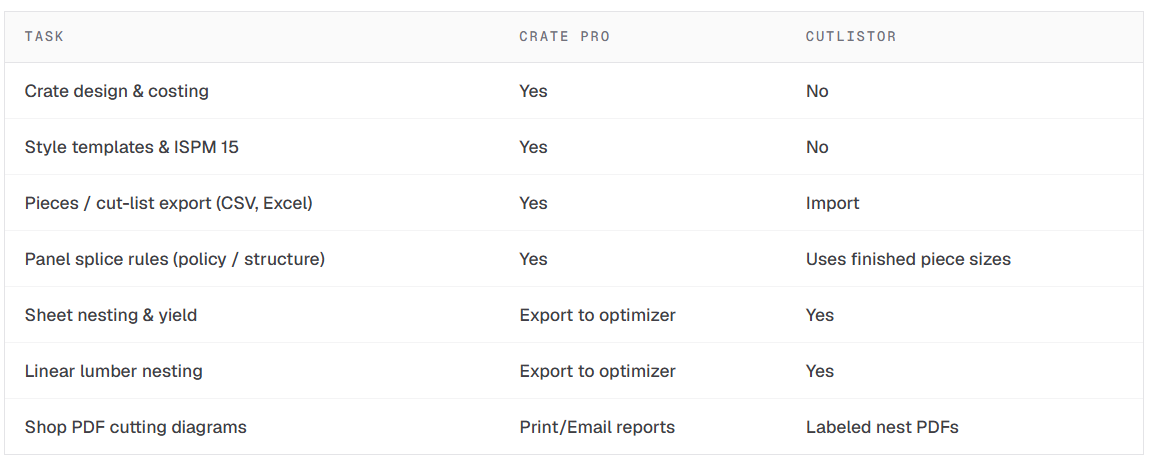 Crate Pro support is explicit: Preferences settings such as “OK to Rotate Panelboard” reduce saw stops when splicing; they are not yield optimization. When you need true nesting, export Details → Pieces to CSV or another flat file and open it in optimizing software.